
Causes, Fixes & Best Practices
Inventory discrepancies are among the most common — and most frustrating — issues faced by SAP Business One users. When the stock quantity shown in SAP Business One doesn’t match what’s physically available in the warehouse, it can lead to inaccurate purchasing decisions, delayed production, financial reporting errors, and reduced customer satisfaction.
The good news is that most inventory mismatches are not software defects. They are typically caused by incorrect transaction flows, backdated postings, warehouse configuration issues, or process inconsistencies that can be identified and resolved systematically.
In this guide, we’ll explain the most common causes of inventory discrepancies in SAP Business One, how to diagnose them, and the best practices to prevent them in the future.
Quick Answer
If your SAP Business One inventory does not match your physical stock, the issue is usually caused by one or more of the following:
- Backdated inventory transactions
- Unrecorded Goods Receipts or Goods Issues
- Incorrect warehouse transfers
- Batch or serial number inconsistencies
- Inventory adjustments without proper verification
- Production order posting errors
- Incorrect user processes
- Add-on or customization issues
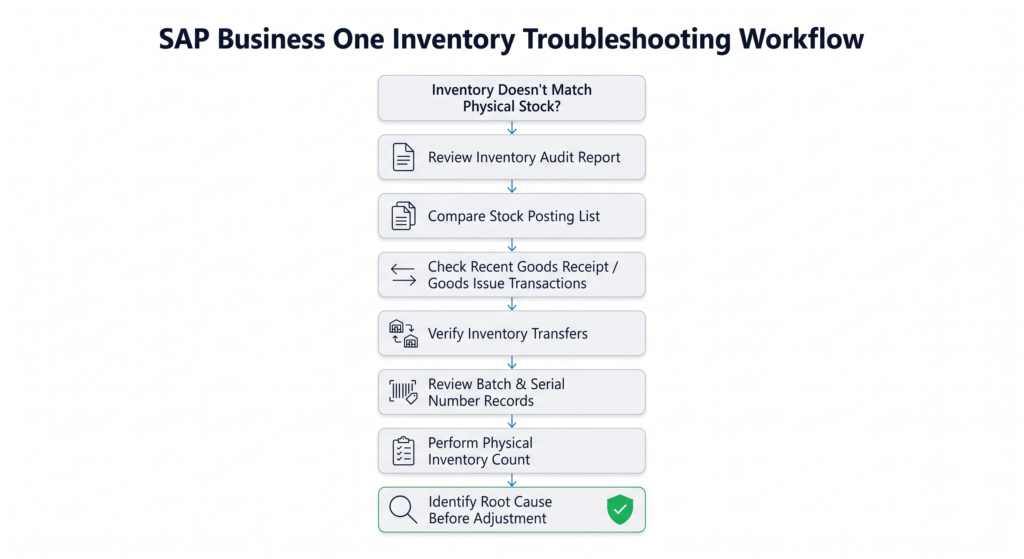
Rather than making manual inventory adjustments immediately, first compare your Inventory Audit Report, Stock Posting List, and recent inventory transactions to identify where the discrepancy originated. Resolving the root cause is far more effective than simply correcting the inventory quantity.
Quick Diagnostic Checklist
Before making any inventory adjustments, verify the following:
Compare the Inventory Audit Report with your physical inventory.
Review the Stock Posting List for unexpected transactions.
Check for recent Goods Receipt POs, Goods Issues, and Inventory Transfers.
Verify whether any backdated postings were entered.
Review Batch Numbers and Serial Numbers if applicable.
Check whether users posted manual inventory adjustments.
Confirm that all warehouse transactions were completed successfully.
Verify whether any third-party add-ons or integrations modified inventory data.
Tip: In many cases, the mismatch is not caused by inventory itself — it originates from a business process that wasn’t followed correctly.
Why Inventory Mismatches Happen in SAP Business One
SAP Business One is designed to maintain inventory accuracy through transaction-based inventory management. Every inventory movement — whether it’s a purchase, sale, production issue, stock transfer, or inventory adjustment — is recorded and reflected across related modules.
However, inventory accuracy depends not only on the software but also on disciplined business processes.
For example, if a warehouse team physically moves inventory but forgets to record an Inventory Transfer, SAP Business One continues to show the stock in its original warehouse. Similarly, if a Goods Receipt is posted twice or a Goods Issue is missed entirely, inventory balances become inaccurate.
These discrepancies accumulate over time, making inventory reconciliation increasingly difficult.
Understanding why inventory mismatches occur is the first step toward preventing them.
1. Backdated Inventory Transactions
Why it happens
One of the most common causes of inventory discrepancies is the posting of backdated inventory transactions.
When users enter inventory movements with an earlier posting date, SAP Business One recalculates inventory balances based on transaction chronology. While this maintains accounting accuracy, it can create confusion when users compare current physical inventory with reports that have been affected by historical postings.
How to identify it
Check:
- Inventory Audit Report
- Stock Posting List
- Transaction dates
- Posting dates
Look for transactions entered after the fact but posted with earlier dates.
Recommended Fix
Establish approval workflows for backdated postings and regularly review transaction history to ensure inventory movements are recorded in chronological order.
2. Unrecorded Goods Receipt or Goods Issue
Why it happens
Inventory should only change when corresponding business transactions are recorded.
If materials are physically received into the warehouse but the Goods Receipt PO is not posted — or if inventory leaves the warehouse without a Goods Issue — SAP Business One and the physical warehouse immediately become out of sync.
This issue commonly occurs during periods of high operational workload or when teams rely on manual processes outside the ERP system.
How to identify it
Compare:
- Purchase documents
- Delivery documents
- Warehouse records
- Physical inventory
Look for inventory movements that occurred physically but were never recorded digitally.
Recommended Fix
Implement standard operating procedures that require every physical inventory movement to be recorded in SAP Business One before warehouse transactions are considered complete.
3. Incorrect Inventory Transfers Between Warehouses
Why it happens
Organizations operating multiple warehouses frequently encounter inventory discrepancies due to incomplete or incorrect inventory transfers.
For example, stock may be physically moved from Warehouse A to Warehouse B without completing the corresponding Inventory Transfer transaction in SAP Business One.
As a result, company-wide inventory appears correct, but warehouse-level inventory becomes inaccurate.
How to identify it
Review:
- Inventory Transfer documents
- Warehouse stock reports
- Physical warehouse inventory
Pay special attention to frequently transferred items.
Recommended Fix
Ensure warehouse transfers are recorded immediately and train warehouse personnel to verify transfer completion before physically relocating stock.
4. Batch Number or Serial Number Errors
Why it happens
Businesses using Batch Management or Serial Number Management require additional transaction accuracy.
Incorrect batch allocation, duplicate serial number assignments, or incomplete batch transactions can create inventory discrepancies that are difficult to identify using quantity reports alone.
These issues are especially common in pharmaceutical, food processing, electronics, and regulated manufacturing industries.
How to identify it
Review:
- Batch Number Transactions
- Serial Number Transactions
- Batch Quantity Reports
- Inventory Audit Report
Verify that physical batch quantities match the recorded batch balances.
Recommended Fix
Conduct periodic batch reconciliation and restrict manual modifications to authorized users with appropriate inventory management responsibilities.
5. Inventory Adjustments and Inventory Counting Errors
Why it happens
Inventory counting is designed to reconcile the physical warehouse with the quantities recorded in SAP Business One. However, discrepancies can arise when inventory counting procedures are incomplete, approvals are bypassed, or manual adjustments are posted without investigating the underlying cause.
While Inventory Adjustment transactions immediately correct stock quantities, they should never be used as a substitute for identifying why the mismatch occurred in the first place.
Frequent inventory adjustments often indicate deeper process issues rather than isolated inventory errors.
How to identify it
Review:
- Inventory Counting documents
- Inventory Posting documents
- Adjustment history
- User activity logs
Look for repeated manual adjustments on the same items or warehouses.
Recommended Fix
Treat inventory adjustments as the final corrective step, not the first response. Always perform a root cause analysis before posting adjustment entries.
6. Production Order Posting Errors
Why it happens
For manufacturing businesses, production transactions directly affect inventory quantities.
If components are issued incorrectly, finished goods are not received into inventory, or production orders remain partially completed, inventory balances can quickly become inaccurate.
These discrepancies are particularly common when production teams perform physical movements first and update SAP Business One later.
How to identify it
Review:
- Production Orders
- Issue for Production
- Receipt from Production
- Bill of Materials (BOM)
- Work-in-progress records
Check whether production transactions accurately reflect the physical movement of raw materials and finished goods.
Recommended Fix
Establish a standardized production posting process that ensures every production issue and receipt is recorded immediately after the physical transaction is completed.
7. Third-Party Add-ons or System Integrations
Why it happens
Many organizations extend SAP Business One using warehouse management systems, barcode applications, eCommerce platforms, custom integrations, or third-party add-ons.
If these integrations fail, process transactions asynchronously, or contain mapping errors, inventory data may become inconsistent between systems.
Although the issue appears inside SAP Business One, the underlying cause often lies outside the ERP itself.
How to identify it
Review:
- Integration logs
- Error logs
- Synchronization history
- API transaction records
- Add-on activity
Compare inventory values across connected systems to identify synchronization failures.
Recommended Fix
Monitor integration logs regularly and configure alerts for failed synchronization events. Any custom add-on that updates inventory should be thoroughly tested before deployment and after major SAP Business One upgrades.
8. User Process and Authorization Issues
Why it happens
Technology rarely causes inventory discrepancies on its own — people and processes usually do.
Common examples include:
- Users posting transactions to the wrong warehouse
- Duplicate Goods Receipts
- Incorrect item codes
- Unauthorized inventory adjustments
- Inconsistent transaction timing
- Lack of standardized operating procedures
Even a well-configured SAP Business One environment cannot maintain accurate inventory if operational processes are inconsistent.
How to identify it
Review:
- User authorizations
- Transaction history
- Change logs
- Frequently occurring user errors
Identify recurring patterns rather than isolated mistakes.
Recommended Fix
Provide periodic user training, implement role-based authorizations, and document standard operating procedures for every inventory-related transaction.

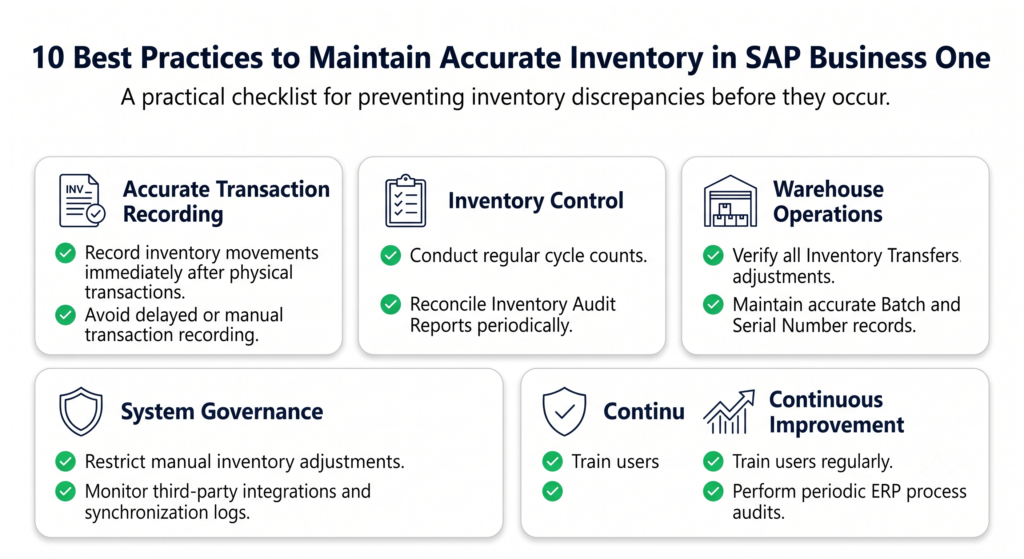
10 Best Practices to Prevent Inventory Mismatches
Preventing inventory discrepancies is significantly easier — and less costly — than correcting them after they occur. Organizations that maintain consistently accurate inventory typically follow a disciplined combination of system controls and operational best practices.
Here are ten recommendations that can help reduce inventory mismatches in SAP Business One:
- Record every inventory movement in SAP Business One immediately after the physical transaction.
- Restrict manual inventory adjustments to authorized personnel only.
- Conduct regular cycle counts instead of relying solely on annual physical inventory.
- Minimize backdated inventory postings and review exceptions through an approval process.
- Standardize inventory transfer procedures across all warehouse locations.
- Periodically reconcile the Inventory Audit Report with physical inventory records.
- Monitor batch and serial number transactions on a regular basis.
- Review integration logs whenever third-party systems interact with inventory data.
- Train warehouse and operations teams on standardized inventory workflows.
- Perform periodic audits to identify recurring process issues before they affect financial reporting.
These practices not only improve inventory accuracy but also strengthen operational visibility, purchasing decisions, production planning, and customer service.
When Should You Contact Your SAP Business One Partner?
Many inventory discrepancies can be resolved internally through disciplined troubleshooting and process improvements. However, some situations require technical investigation by experienced SAP Business One consultants.
You should consider seeking expert assistance if:
- Inventory discrepancies continue despite repeated reconciliations.
- Inventory valuation reports remain inconsistent.
- Batch or serial number records appear corrupted.
- Third-party integrations are affecting inventory accuracy.
- Production transactions generate unexpected inventory movements.
- Customizations or add-ons modify inventory data.
- Database-level inconsistencies are suspected.
An experienced implementation partner can help identify whether the issue stems from system configuration, business processes, custom developments, or user practices, reducing the risk of recurring inventory problems.
Final Thoughts
Inventory accuracy is fundamental to every successful ERP implementation.
When SAP Business One inventory doesn’t match physical stock, the immediate temptation is often to adjust quantities and move on. In practice, that approach treats the symptom rather than the cause.
Most inventory discrepancies originate from everyday operational processes — backdated postings, incomplete warehouse transactions, production posting errors, batch management issues, or inconsistent user practices.
By adopting standardized inventory procedures, regularly reviewing key reports, and investigating discrepancies methodically, organizations can significantly improve inventory accuracy and reduce costly operational disruptions.
Ultimately, the goal isn’t simply to reconcile inventory — it’s to build reliable business processes that keep inventory accurate in the first place.
Frequently Asked Questions (FAQ)
Inventory Reports & Reconciliation
1. Why does SAP Business One inventory not match physical stock?
The most common reasons include backdated transactions, missing Goods Receipts or Goods Issues, incorrect warehouse transfers, production posting errors, batch or serial number inconsistencies, and manual inventory adjustments. The first step should always be to identify the root cause rather than simply adjusting inventory quantities.
2. Which report should I check first when inventory doesn’t match?
Start with the Inventory Audit Report, then compare it with the Stock Posting List and recent inventory transactions. These reports help identify where the discrepancy originated.
3. What is the difference between the Inventory Audit Report and the Stock Posting List?
The Inventory Audit Report focuses on inventory valuation and transaction history, while the Stock Posting List records individual inventory movements. Comparing both reports often helps identify inconsistencies.
4. Can I simply adjust inventory to fix the mismatch?
Inventory adjustments should only be used after identifying the underlying cause. Repeated adjustments without investigation usually indicate process issues that will continue to create discrepancies.
5. How often should inventory reconciliation be performed?
High-volume businesses should perform cycle counts regularly, while a full inventory reconciliation should be conducted periodically based on operational requirements and internal controls.
Warehouse & Inventory Transactions
6. Why are inventory quantities different between warehouses?
The most common causes are incomplete Inventory Transfers, incorrect warehouse selection during transactions, or physical stock movements that were never recorded in SAP Business One.
7. Can backdated transactions change inventory reports?
Yes. Because SAP Business One processes inventory chronologically, backdated postings can affect inventory balances, valuation, and historical reports.
8. Why does inventory become negative?
Negative inventory usually occurs when inventory is issued before it is received, incorrect posting dates are used, or inventory transactions are recorded out of sequence.
9. Can Goods Receipt or Goods Issue mistakes affect inventory?
Absolutely. Missing, duplicate, or incorrect Goods Receipt and Goods Issue transactions are among the most common reasons for inventory mismatches.
10. Why is inventory correct overall but incorrect for one warehouse?
This typically indicates missing or incorrect Inventory Transfer transactions rather than an issue with total company inventory.
Batch & Serial Number Management
11. Why don’t batch quantities match physical stock?
Batch discrepancies often result from incorrect batch allocations, manual adjustments, incomplete transactions, or operational errors during receiving and issuing.
12. Can serial number mistakes affect inventory accuracy?
Yes. Incorrect serial number assignments can create discrepancies between recorded inventory and physical stock, especially in regulated industries.
13. Should batch reconciliation be performed regularly?
Yes. Organizations using batch-managed inventory should periodically verify batch quantities against physical inventory to detect discrepancies early.
14. Are batch issues usually caused by SAP Business One?
Most batch issues are process-related rather than software defects. Accurate transaction entry and disciplined warehouse procedures significantly reduce these problems.
15. Can barcode systems reduce batch errors?
Yes. Barcode scanning minimizes manual data entry, improves transaction accuracy, and reduces the likelihood of batch or serial number mistakes.
Production & Manufacturing
16. Can production orders cause inventory discrepancies?
Yes. Missing Issue for Production or Receipt from Production transactions frequently lead to inventory differences in manufacturing environments.
17. Why doesn’t my finished goods inventory match production output?
This usually indicates incomplete production postings, incorrect Bill of Materials usage, or delayed transaction recording.
18. Should production transactions be posted immediately?
Yes. Recording production transactions immediately after physical movement helps maintain inventory accuracy and financial consistency.
Performance & Best Practices
19. Can third-party add-ons affect inventory?
Yes. Poorly configured integrations, synchronization failures, or custom developments can sometimes create inventory inconsistencies.
20. How can I prevent inventory mismatches in SAP Business One?
Maintain standardized inventory procedures, minimize backdated postings, conduct regular cycle counts, train users consistently, and review key inventory reports on a routine basis.
21. When should I contact my SAP Business One implementation partner?
If inventory discrepancies persist after standard troubleshooting, involve an experienced implementation partner to investigate configuration issues, integrations, or customizations.
22. Does user training improve inventory accuracy?
Yes. Many inventory discrepancies are caused by inconsistent transaction practices rather than system limitations. Regular user training significantly reduces operational errors.
23. Are inventory discrepancies a software bug?
In most cases, no. Inventory mismatches are typically caused by business process gaps, transaction timing, or operational practices rather than defects in SAP Business One itself.
24. What’s the best long-term strategy for maintaining inventory accuracy?
Combine disciplined operational processes with regular audits, standardized workflows, periodic user training, and proactive monitoring of inventory reports.
25. Can AI help troubleshoot SAP Business One inventory issues?
AI assistants can help explain common causes, troubleshooting approaches, and best practices. However, resolving complex inventory discrepancies often requires access to your SAP Business One configuration, transaction history, and business processes, making expert implementation support valuable for persistent issues.
Final Takeaway
Inventory discrepancies in SAP Business One are rarely caused by a single issue. More often, they result from a combination of transaction timing, operational processes, warehouse practices, and system configuration.
By following a structured troubleshooting approach, reviewing the right reports, and strengthening inventory management processes, organizations can significantly reduce discrepancies and improve the reliability of their ERP data.
For businesses where inventory accuracy directly impacts production, procurement, and financial reporting, investing time in prevention is far more effective than repeatedly correcting inventory after problems occur.
If your organization continues to experience recurring inventory discrepancies despite following best practices, consulting an experienced SAP Business One implementation partner can help identify deeper configuration or process-related issues and establish long-term corrective measures.